

Customer Relationship Management Software Comparison: 9 CRMs
Picking a CRM shouldn't require a PhD in software evaluation, but it often feels that way. There are dozens of platforms on the market, each claiming to be the one that'll fix your sales pipeline. A proper customer relationship management software comparison strips away the marketing noise and puts real features, pricing, and trade-offs side by side so you can make a decision based on facts, not sales pages.
The truth is, most sales teams don't need the bloated enterprise suite they end up paying for. They need something that handles leads efficiently, keeps communication organized, and actually gets used by the team every day. What separates a good CRM from a bad fit often comes down to specific workflows, how you contact leads, where those leads come from, and how much you're willing to spend per seat each month.
At LeadMailbox, we've spent over 20 years building a lead management and sales enablement platform that combines CRM functionality with built-in telephony, SMS, email campaigns, and AI agents, all without nickel-and-diming on add-ons. We know this space inside and out because we operate in it. That perspective shapes this comparison. Below, we break down nine CRM platforms across features, pricing, and ideal use cases so you can find the right match for your team. Whether you're a solo sales rep or managing a growing team, this guide gives you what you need to choose with confidence.
1. LeadMailbox
LeadMailbox is a lead management and sales enablement platform built specifically for sales teams that handle high lead volumes. It has been in operation since 2004, which means the platform's features reflect real-world sales workflows rather than theoretical ones. For any customer relationship management software comparison focused on outbound sales execution, LeadMailbox stands out because it combines telephony, messaging, and lead management in a single system.
What it is and how it works
Built around a centralized lead inbox, LeadMailbox gives your team a clear view of every contact, interaction, and follow-up task in one place. You manage leads from intake through close without jumping between tools. The platform runs on a month-to-month subscription model, so you're not locked into annual contracts as your team grows or shifts.
Lead capture, routing, and pipeline management
The platform pulls leads from multiple sources simultaneously and routes them into the correct pipeline based on rules you define, such as geography, lead type, or rep assignment. You can customize pipeline stages to match your actual sales process, and the real-time status updates keep every team member current on where each lead stands without needing separate check-ins.

Calling, SMS, and email outreach tools
LeadMailbox includes a full telephony suite with click-to-call, a power dialer, insta-call functionality, and inbound number management. You run SMS and email campaigns from the same platform without adding a third-party tool, which keeps all outreach data in one place.
For sales teams that work leads primarily by phone, having the dialer and CRM in the same system removes real friction from the daily workflow and reduces the chance that contact attempts fall through the cracks.
AI agents and automation capabilities
Your AI agents can respond to incoming text messages, answer inbound calls, and draft email replies automatically. This allows your reps to focus on high-value conversations while routine follow-ups run in the background. You configure the AI around your specific scripts and lead types instead of adapting your process to a rigid, generic setup.
Integrations and lead-source connectivity
Connectivity with hundreds of lead partners makes LeadMailbox a strong choice if you buy third-party leads or work with multiple vendors. The integration layer is designed specifically for lead-heavy workflows, not just general app connections, so incoming leads land in the right place with the right data attached.
Best fit and deal-breakers
This platform works best for small to mid-sized sales teams that rely on phone and SMS outreach and manage high lead volumes daily. If your priority is deep marketing automation, complex customer service ticketing, or enterprise analytics dashboards, LeadMailbox may fall short. It is purpose-built for sales execution rather than broad CRM use.
Pricing and typical costs
Pricing follows a month-to-month model with no long-term contracts required, which keeps risk low if your team size changes. Final costs depend on your seat count and selected features, so contacting LeadMailbox directly for a tailored quote is the most accurate way to understand what you'll pay.
2. HubSpot CRM
HubSpot CRM is one of the most recognized names in any customer relationship management software comparison, and for good reason. It covers sales, marketing, and customer service in a single platform with a free tier that makes it accessible to teams just getting started.
What it is and how it works
HubSpot organizes your contacts, deals, and tasks inside a clean interface built around the inbound methodology. Every interaction your team logs ties back to a contact record, giving you a full history of emails, calls, and meetings without manual data entry.
Sales, marketing, and service coverage
The platform splits into separate Hubs: Sales Hub, Marketing Hub, Service Hub, and more. Each Hub covers its respective function, and you can combine them. This means your sales pipeline, marketing campaigns, and support tickets can all live under one login, though the cost rises quickly as you add Hubs.
If your team needs both sales and marketing in a single system, HubSpot handles that overlap better than most standalone CRMs.
Automation and AI capabilities
HubSpot's workflow builder lets you automate lead rotation, follow-up emails, and task creation without writing code. Its AI tools include email drafting assistance, conversation intelligence, and predictive lead scoring on higher tiers, which saves time on repetitive outreach tasks.
Integrations and ecosystem fit
HubSpot connects with over 1,500 apps through its marketplace, covering tools from Google Workspace and Microsoft 365 to payment processors and ad platforms. Native connections to major ad networks let you tie campaign spend directly to pipeline revenue inside the same dashboard.
Best fit and deal-breakers
Teams in the growth stage that need marketing and sales under one roof get the most from HubSpot. The deal-breaker is pricing: advanced features sit behind Professional and Enterprise tiers that cost significantly more than the free version suggests.
Pricing and typical costs
The free CRM tier covers basic contact management. Paid Sales Hub plans start around $20 per seat per month on the Starter tier, with Professional starting around $100 per seat per month, billed annually.
3. Salesforce Sales Cloud
Salesforce Sales Cloud is the dominant enterprise CRM in most customer relationship management software comparison articles, and it has earned that position through sheer feature depth. It handles complex sales operations at scale, but that power comes with a significant learning curve and a price tag to match.
What it is and how it works
Salesforce is built on a flexible data model where objects, fields, and relationships are configurable to match almost any business process. Your team manages leads, contacts, accounts, and opportunities in a structured pipeline, and every record ties back to a full interaction history across channels.
Customization, objects, and workflow depth
The platform lets you build custom objects, validation rules, and page layouts without writing code, though advanced configurations typically require a Salesforce administrator or developer. You can model highly specific sales processes that most other CRMs cannot replicate without third-party workarounds.
If your sales workflow has multiple stages with strict entry and exit criteria, Salesforce gives you the tools to enforce those rules at the data level.
Reporting, forecasting, and AI features
Salesforce's reporting builder lets you create dashboards and custom reports across any combination of objects in your org. Einstein AI, the platform's built-in intelligence layer, adds predictive lead scoring, opportunity health signals, and automated activity capture on higher-tier plans.
Integrations and admin requirements
The AppExchange marketplace offers thousands of integrations, from accounting software to telephony providers. That breadth is useful, but integrations often require careful setup and ongoing maintenance, which means you should plan for dedicated admin time to keep the system running cleanly.
Best fit and deal-breakers
Salesforce fits mid-sized to enterprise sales teams with complex processes, large rep counts, and the IT resources to support the platform. For smaller teams, the administrative overhead and cost often outweigh the benefits.
Pricing and typical costs
Salesforce Sales Cloud starts at $25 per user per month on the Starter Suite, with the more capable Professional plan at $80 per user per month and Enterprise at $165 per user per month, all billed annually.
4. Zoho CRM
Zoho CRM is a full-featured platform that competes at every tier of the market, from solo operators to enterprise sales teams. It holds a strong position in any customer relationship management software comparison because it delivers a wide feature set at a price point that underpins most of its competitors.
What it is and how it works
Zoho CRM organizes your sales data around contacts, leads, deals, and accounts, giving you a clear pipeline view from first touch through close. The interface is straightforward, and most teams get up and running without extensive onboarding. Configuration options let you match the platform to your existing process rather than rebuilding your process around the tool.
Core CRM features and pipeline management
Your pipeline management in Zoho centers on Kanban-style boards and list views that you can switch between depending on how your team prefers to work. Built-in email integration, activity logging, and deal tracking cover the fundamentals without requiring add-ons.
Teams managing high lead volumes will appreciate that Zoho handles lead assignment rules and scoring out of the box on mid-tier plans.
Automation and AI capabilities
Zoho's workflow automation builder handles routine tasks like lead assignment, follow-up reminders, and field updates based on triggers you define. Zia, Zoho's AI assistant, adds predictive lead scoring, anomaly detection, and conversation insights on the higher-tier plans, though you won't find it on the entry-level options.
Integrations and Zoho suite advantages
One of Zoho CRM's clearest strengths is its connection to the broader Zoho product suite, which includes marketing automation, help desk, accounting, and project management tools. If your business already uses Zoho products, the native data flow between apps reduces the need for third-party connectors.
Best fit and deal-breakers
Zoho fits budget-conscious teams that want feature depth without enterprise pricing. The trade-off is that the interface can feel cluttered as you activate more modules, which slows adoption.
Pricing and typical costs
Zoho CRM's Standard plan starts at $14 per user per month, with Professional at $23 and Enterprise at $40, all billed annually.
5. Pipedrive
Pipedrive is a sales-focused CRM built around one core idea: your team should spend time selling, not managing software. In any customer relationship management software comparison, it stands out for its pipeline-first design that puts deal progression front and center rather than burying it under layers of marketing or service features.
Pipeline-first sales management
Pipedrive organizes every deal on a visual Kanban board that gives your team an instant read on where each opportunity stands. You move deals through custom pipeline stages with a drag-and-drop interface, and the platform flags stalled deals automatically so nothing gets forgotten in a busy week.

For sales teams that live by their pipeline, this visual-first approach reduces the time your reps spend digging through lists to understand their daily priorities.
Automation, email, and activity tracking
Pipedrive's workflow automation tools handle routine tasks like creating follow-up activities, sending templated emails, and updating deal stages based on rep actions. The built-in email sync and tracking shows you when a contact opens a message, which helps your team time follow-up calls more effectively without relying on gut instinct.
Integrations and add-ons to expect
Pipedrive connects with over 400 apps, covering tools for email marketing, scheduling, reporting, and telephony. Some capabilities that other CRMs include natively, such as advanced email campaigns and lead generation features, sit behind paid add-ons in Pipedrive's model, so factor that into your total cost estimate before committing.
Best fit and deal-breakers
Pipedrive suits small to mid-sized sales teams that prioritize clean deal management over broad platform coverage. Teams that need deep marketing automation, customer support ticketing, or complex approval workflows will likely need additional tools alongside it.
Pricing and typical costs
Pipedrive's Essential plan starts at $14 per seat per month, with Advanced at $29, Professional at $59, and Power at $69, all billed annually. The add-ons for campaigns and lead generation increase your monthly total noticeably.
6. Zendesk Sell
Zendesk Sell sits in an interesting position within any customer relationship management software comparison because it comes from a company best known for customer support software. The result is a sales CRM designed to work alongside service teams, which makes it a distinctive option if your organization handles both new sales and ongoing account management.
What it is and how it works
Zendesk Sell gives your sales reps a pipeline-based workspace where they manage contacts, track deals, and log communications in a clean interface. The platform shares architecture with Zendesk's support products, which means data flows naturally between sales and service records without custom integration work.
Sales CRM plus service-team alignment
Where Zendesk Sell separates itself from purely sales-focused tools is its native connection to Zendesk Support. When a prospect becomes a customer, your service team can pull the full sales history immediately, which eliminates the awkward handoff that frustrates both your team and your customers.
If your business cares about continuity between the sales conversation and the post-sale relationship, Zendesk Sell solves that problem without a third-party connector.
Automation and productivity features
The platform includes sequence-based email automation and task automation that handles routine follow-up steps without rep intervention. Built-in call logging and email tracking keep every contact record current, so your team spends less time updating the CRM and more time running conversations.
Integrations with Zendesk and beyond
Beyond its native Zendesk ecosystem, Sell connects with common business tools through the Zendesk marketplace and Zapier. The native integrations cover the basics, but teams that rely on specialized tools may find the third-party marketplace smaller than what Salesforce or HubSpot offer.
Best fit and deal-breakers
Zendesk Sell fits teams that already use Zendesk Support or want sales and service data unified from day one. Teams that need a standalone CRM with a broad app ecosystem may find better options elsewhere.
Pricing and typical costs
Zendesk Sell's Team plan starts at $19 per agent per month, with Growth at $55 and Professional at $115, billed annually.
7. Freshsales
Freshsales is a sales CRM from Freshworks that targets teams looking for a capable platform without the complexity overhead of enterprise tools. In any customer relationship management software comparison, it lands in a useful middle ground: more capable than basic CRMs but far less demanding than Salesforce or Microsoft Dynamics.
What it is and how it works
The platform organizes your contacts, leads, accounts, and deals in a unified workspace where your team tracks every interaction from first contact through close. Built-in automatic activity capture logs calls, emails, and meetings directly to contact records without requiring your reps to enter data manually after each interaction.
Lead management and pipeline execution
Your pipeline in Freshsales uses customizable stages and visual deal boards that let your team prioritize high-value opportunities without sifting through cluttered lists. Built-in phone and email tools mean your reps handle outreach directly inside the CRM rather than switching between applications throughout the day.
Teams with high daily contact volumes benefit from Freshsales' auto-assignment rules, which route incoming leads to the right rep instantly based on criteria you define.
AI features and workflow automation
Freddy AI, Freshsales' built-in intelligence layer, delivers lead scoring, deal insights, and next-step recommendations without requiring a separate tool. The workflow automation builder handles repetitive tasks like follow-up reminders, stage updates, and lead assignments based on triggers your team configures without writing code.
Integrations and Freshworks suite fit
Freshsales connects natively with Freshdesk, Freshchat, and other Freshworks products, which makes it a strong choice if your business already operates within that ecosystem. Third-party integrations cover common tools including Google Workspace, Microsoft 365, and Slack, though the marketplace is smaller than HubSpot's or Salesforce's.
Best fit and deal-breakers
This platform suits small to mid-sized teams that want AI-assisted selling without a complex implementation. If you need deep customization or a large third-party integration library, you may find the platform limiting over time.
Pricing and typical costs
Freshsales offers a free plan for up to three users. Paid plans start at $9 per user per month on the Growth tier, with Pro at $39 and Enterprise at $59, billed annually.
8. Microsoft Dynamics 365 Sales
Microsoft Dynamics 365 Sales belongs in any serious customer relationship management software comparison when the business already operates inside the Microsoft ecosystem. It is a enterprise-grade sales platform designed for organizations that need deep process control, native Office integration, and the ability to scale across large teams or multiple regions.
What it is and how it works
Dynamics 365 Sales manages your contacts, accounts, leads, and opportunities inside a structured workspace that mirrors enterprise sales workflows. Every record connects to your existing Microsoft 365 data, so emails from Outlook, meetings from Teams, and documents from SharePoint attach to contact records automatically without manual logging.
Sales process management and customization
The platform lets you define business process flows that guide your reps through each deal stage with specific required fields, steps, and approvals. You can configure these flows for different sales motions, such as new business versus renewal, so the system enforces the right process depending on the deal type rather than applying a one-size-fits-all pipeline.
If your organization runs formal sales methodologies with strict stage gates, Dynamics 365 handles that enforcement at the platform level without workarounds.
Reporting, AI, and analytics considerations
Dynamics 365 Sales includes Copilot AI, Microsoft's embedded intelligence layer, which surfaces deal summaries, meeting prep notes, and follow-up recommendations directly inside the selling workflow. Pipeline analytics and forecasting dashboards pull live data across your team, and Power BI connects natively if you need deeper custom reporting beyond the built-in views.
Integrations with Microsoft 365 and Power Platform
The native connection to Microsoft 365 and the Power Platform is the clearest advantage Dynamics 365 holds over most alternatives. Power Automate handles cross-system workflow automation, and Power Apps lets your team extend the CRM with custom applications without a full development cycle.

Best fit and deal-breakers
Dynamics 365 fits mid-sized to enterprise organizations already invested in the Microsoft stack. Smaller teams without dedicated IT support often find the setup complexity and cost difficult to justify.
Pricing and typical costs
Dynamics 365 Sales starts at $65 per user per month on the Professional plan, with the Premium tier at $95 per user per month, billed annually.
9. SugarCRM
SugarCRM rounds out this customer relationship management software comparison as a platform built for organizations that want serious control over their data model and deployment options. It targets teams that find standard CRMs too rigid but don't want to pay Salesforce prices for that level of customization depth.
What it is and how it works
SugarCRM gives your team a centralized workspace for managing contacts, accounts, opportunities, and cases across the full sales cycle. The platform runs as both a cloud deployment and an on-premises installation, which is a differentiator most competitors dropped years ago, giving you genuine flexibility over where your data lives and how it's governed.
Customization and data model flexibility
The platform lets you modify the underlying data model by adding custom fields, modules, and relationships without requiring a full development team on staff. You configure layouts, workflows, and record views through a visual studio interface, which reduces the amount of code your team needs to write to get the system behaving the way your actual sales process works.
If your organization has compliance requirements around data residency, SugarCRM's on-premises option solves a problem most cloud-only CRMs simply cannot address.
Automation, marketing, and reporting options
SugarCRM includes workflow automation tools that handle lead assignment, follow-up tasks, and field updates based on triggers your team defines. The platform's built-in reporting module lets you build custom dashboards and export data across any module, giving your managers a clear read on pipeline health without relying on separate analytics tools.
Integrations and implementation considerations
SugarCRM connects with common business tools through native integrations and REST API access, covering email platforms, ERP systems, and marketing automation tools. Implementation complexity runs higher than simpler CRMs, so budget for meaningful setup time or professional services if your configuration requirements are extensive.
Best fit and deal-breakers
SugarCRM fits mid-sized organizations with specific data control or compliance needs and the technical capacity to configure the platform properly. Teams without dedicated in-house technical resources often find the initial setup more demanding than expected.
Pricing and typical costs
SugarCRM's Sell Essentials plan starts at $19 per user per month, with Sell Advanced at $45 and Sell Premier at $85, all billed annually.
Next steps
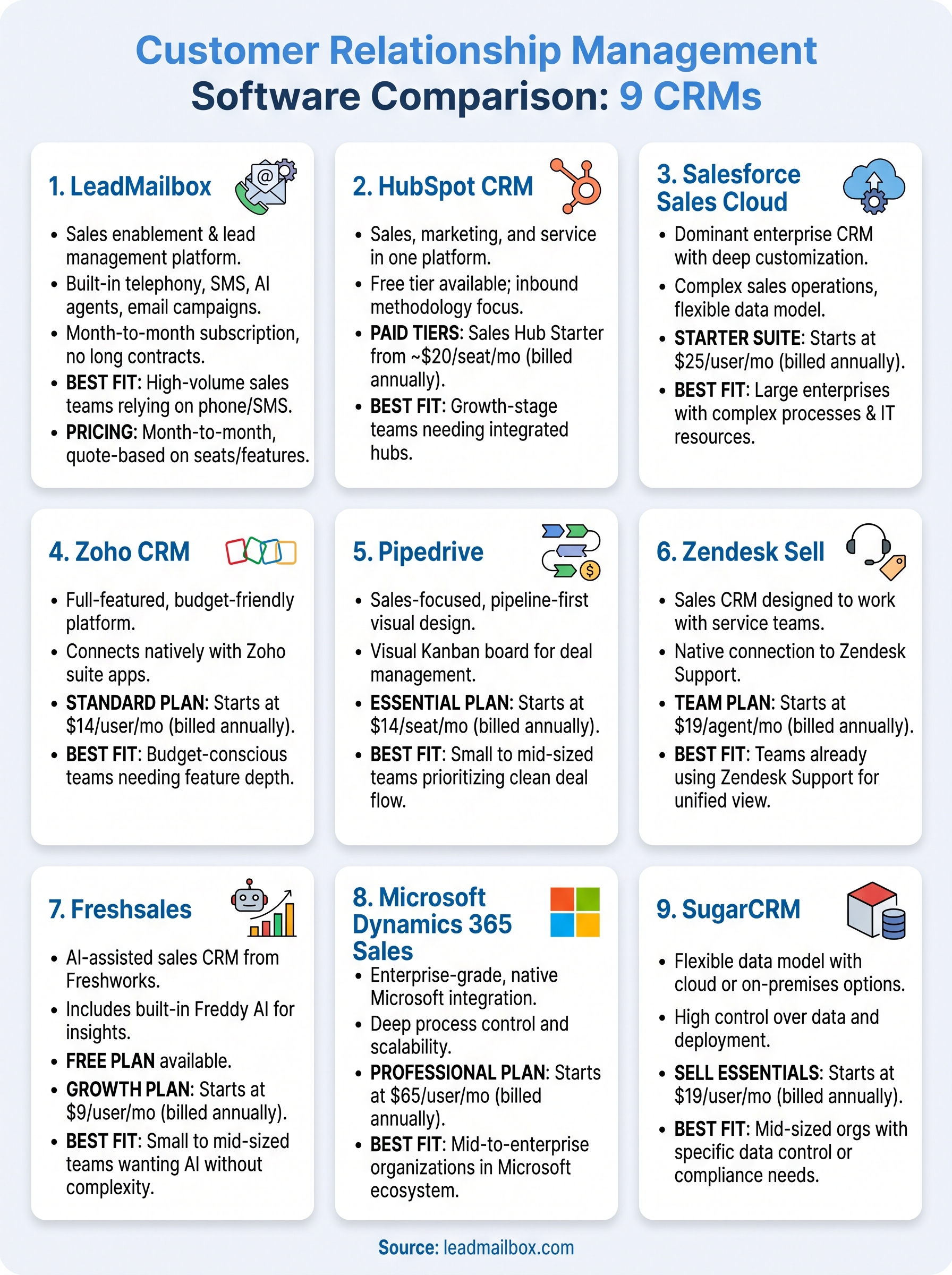
This customer relationship management software comparison gives you a clear picture of what each platform does well and where it falls short. The right choice depends on your team size, primary sales channels, and budget, not on which platform has the most name recognition. Enterprise tools like Salesforce and Dynamics 365 serve large organizations with dedicated admin resources. Mid-market options like Zoho and Freshsales hit a strong value point for growing teams. Pipedrive and Zendesk Sell handle specific use cases cleanly.
If your team runs high lead volumes through phone and SMS outreach and you want a platform that combines lead management, built-in telephony, AI agents, and email campaigns without stacking separate tools, LeadMailbox is worth a closer look. You get everything in one place on a month-to-month subscription with no long-term commitment. Visit LeadMailbox to see how the platform handles your specific workflow before you commit to anything.